> ## Documentation Index
> Fetch the complete documentation index at: https://manuals.cobo.com/llms.txt
> Use this file to discover all available pages before exploring further.
# Introduction to Cobo Portal Apps
> Get an overview of Cobo Portal Apps, designed to enrich user experiences in investing and managing digital assets.
Leveraging the capabilities of the [WaaS 2.0 API](https://www.cobo.com/developers/v2/guides/overview/introduction), Cobo collaborates with third-party developers to build a robust business application ecosystem through Cobo Portal Apps, enriching the way users invest, trade, and manage their digital assets.
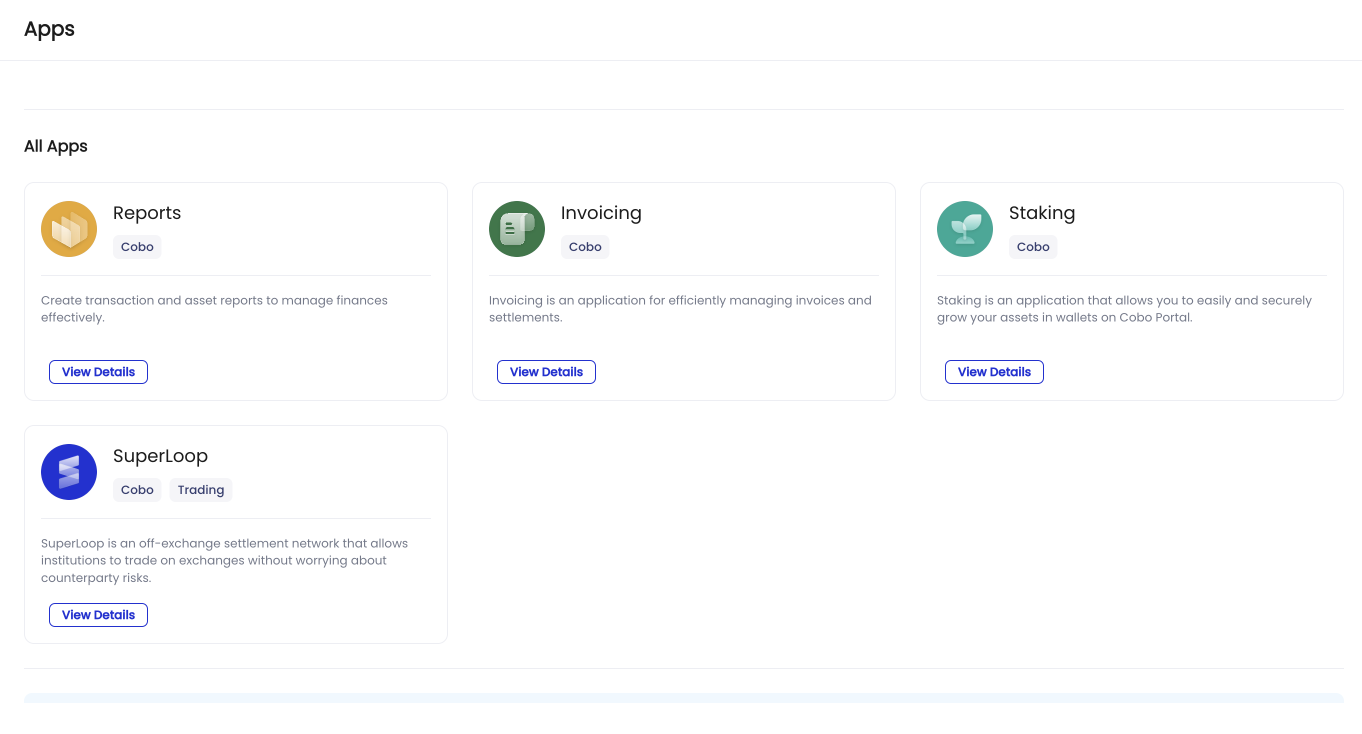
You can easily explore and manage Cobo Portal Apps by clicking **Apps** in the left sidebar of Cobo Portal.
 ## Key features
### Comprehensive apps developed by Cobo
Cobo develops a wide array of Cobo Portal Apps, providing digital asset services such as off-exchange settlement (SuperLoop), on-chain digital asset management solutions built on [Smart Contract Wallets](/en/portal/smart-contract-wallets), as well as staking and restaking services in one centralized location.
### Innovative apps developed by third-party developers
Through the WaaS 2.0 API, Cobo facilitates collaboration with third-party developers to expand the range of available Cobo Portal Apps continuously. Developers can publish these applications to all Cobo Portal users. For more information, see [Build your own apps](/en/apps/build).
### Seamless integration
Cobo Portal Apps integrate seamlessly with the Cobo Portal ecosystem, providing a unified experience for discovering, installing, and managing applications.
## How to use
Follow these steps to use Cobo Portal Apps:
[Browse and install the app](/en/apps/browse-and-install) you want to use.
If the app involves transactions, set up [transaction policies](/en/apps/transaction-policies) to automate how each transaction will be handled, including approval rules.
(Optional) You can [update the app’s settings](/en/apps/app-settings), such as permissions and wallet scope required by the app.
(Optional) You can also [customize the approval workflows](/en/apps/workflow) to define specific actions in the app that require approvals.
If you're interested in building your own [Cobo Portal Apps](/en/apps/introduction) for all users on Cobo Portal, see [Introduction to Cobo Portal App development](https://www.cobo.com/developers/v2/apps/introduction) on Developer Hub.
## Key features
### Comprehensive apps developed by Cobo
Cobo develops a wide array of Cobo Portal Apps, providing digital asset services such as off-exchange settlement (SuperLoop), on-chain digital asset management solutions built on [Smart Contract Wallets](/en/portal/smart-contract-wallets), as well as staking and restaking services in one centralized location.
### Innovative apps developed by third-party developers
Through the WaaS 2.0 API, Cobo facilitates collaboration with third-party developers to expand the range of available Cobo Portal Apps continuously. Developers can publish these applications to all Cobo Portal users. For more information, see [Build your own apps](/en/apps/build).
### Seamless integration
Cobo Portal Apps integrate seamlessly with the Cobo Portal ecosystem, providing a unified experience for discovering, installing, and managing applications.
## How to use
Follow these steps to use Cobo Portal Apps:
[Browse and install the app](/en/apps/browse-and-install) you want to use.
If the app involves transactions, set up [transaction policies](/en/apps/transaction-policies) to automate how each transaction will be handled, including approval rules.
(Optional) You can [update the app’s settings](/en/apps/app-settings), such as permissions and wallet scope required by the app.
(Optional) You can also [customize the approval workflows](/en/apps/workflow) to define specific actions in the app that require approvals.
If you're interested in building your own [Cobo Portal Apps](/en/apps/introduction) for all users on Cobo Portal, see [Introduction to Cobo Portal App development](https://www.cobo.com/developers/v2/apps/introduction) on Developer Hub.